Management software for boat rental companies

Your rental base. Finally under control.

Inspections, security deposits, contracts, planner, payments, workshop, staff and owner management: SunSea Hub brings your whole business together, from the pontoon to the office.

30-day free trial, no commitment · Already a customer? Log in

Do you own a boat and want a professional to rent it out? Renting out your boat

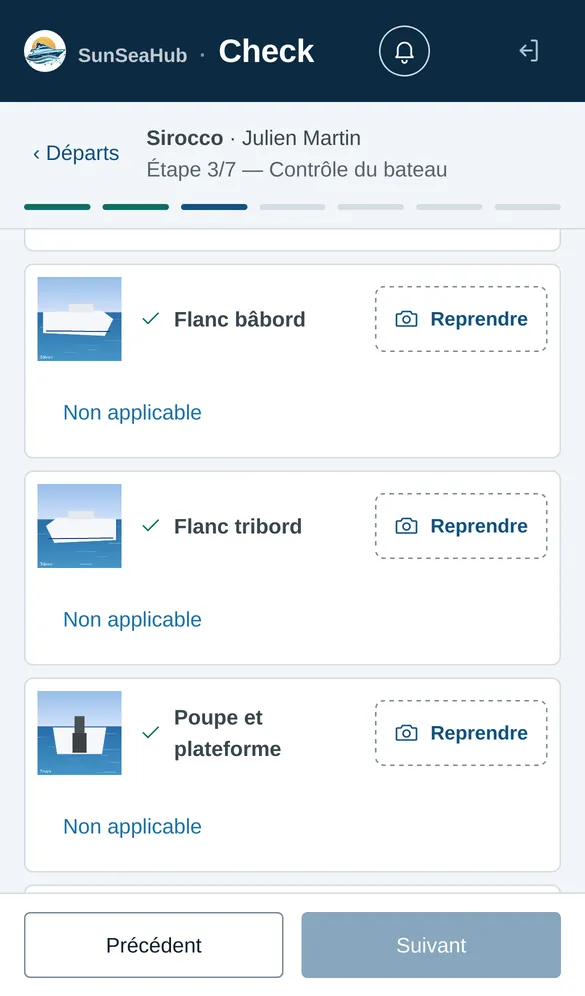
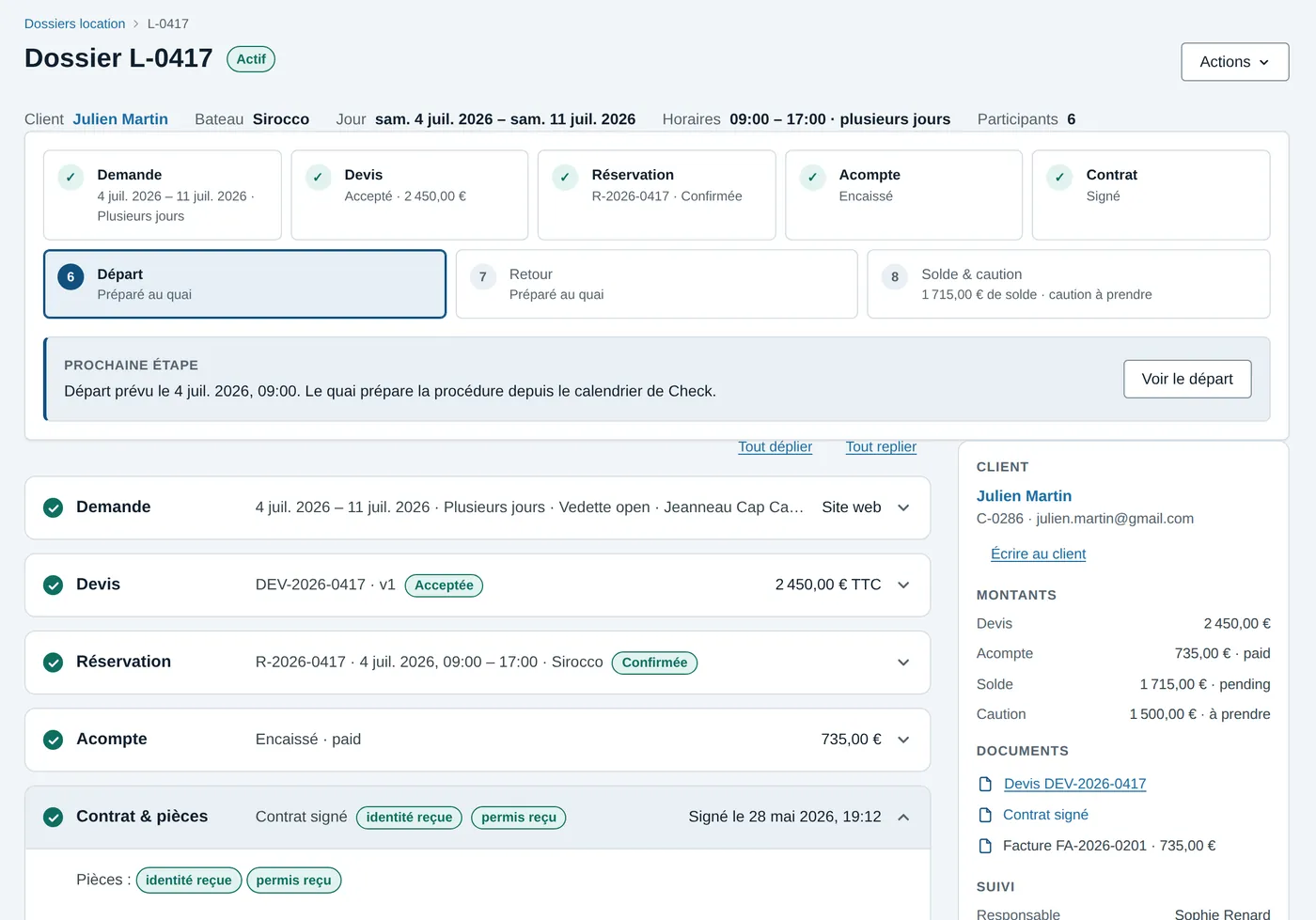
A booking in Fleet: the eight steps, the amounts and the documents.The Check dock app: the departure photo plan.

Deposit authorisedCard pre-authorisation, not charged

PlannerPaymentsMaintenanceTeamsOwner managementMonitoring

In brief

SunSea Hub, the management software for boat rental companies.

What it is
Online management software for boat rental companies.
Who it is for
Rental bases renting by the half-day, day or week, with or without a licence, bareboat or skippered — and those managing boats on behalf of owners.
Four apps
Fleet at the office, Check at the dock, Fix in the workshop and Sup for owners, on the same bookings.
On which devices
In the browser, on computer, tablet or phone: nothing to install.
Pricing
Three plans billed per boat per month, with no minimum term, on quote during the launch.
Trial
30 days free, no commitment, once the base is set up with you.
Languages
Fleet, Check, Fix and Sup are in French today. What your renters read — booking widget, quotes, payment links, messages — is in English, French and German; the rental contract in English and French.

A rental, from first message to final balance

Eight steps, one booking.

The office and the dock work on the same booking: what Fleet prepares, Check carries out on the pontoon.

  1. EnquiryWebsite, phone or booking widgetFleet
  2. QuoteSent as a link, confirmed with one tapFleet
  3. BookingIn the planner, the single referenceFleet
  4. Advance paymentPaid online by linkFleet
  5. Contract & documentsDocuments read automaticallyCheck
  6. DeparturePhotos, inventory, signature, depositCheck
  7. ReturnCompared with departure, rechargedCheck
  8. Balance & depositDeposit released automaticallyFleet

Four apps, one account

Each team has its own screen. All of them work on the same bookings.

  • At the office

    Fleet

    Fleet, customers, bookings, planner, rates, documents and payments: everything that gets decided is decided here.

    Discover Fleet
  • At the dock, on a phone

    Check

    The departure and return procedure, step by step: photo inspection, inventory, fuel, cleaning, return charges.

    Discover Check
  • In the workshop

    Fix

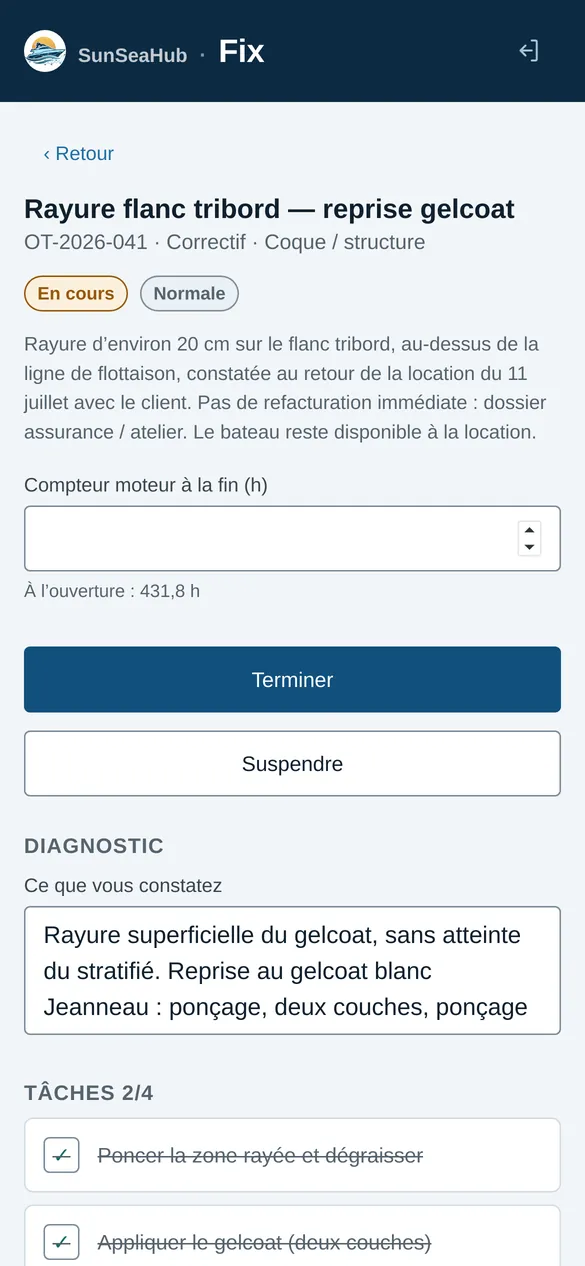
    Boats sorted by urgency, work orders, maintenance plans and the real cost of every job.

    Discover Fix
  • For your owners

    Sup

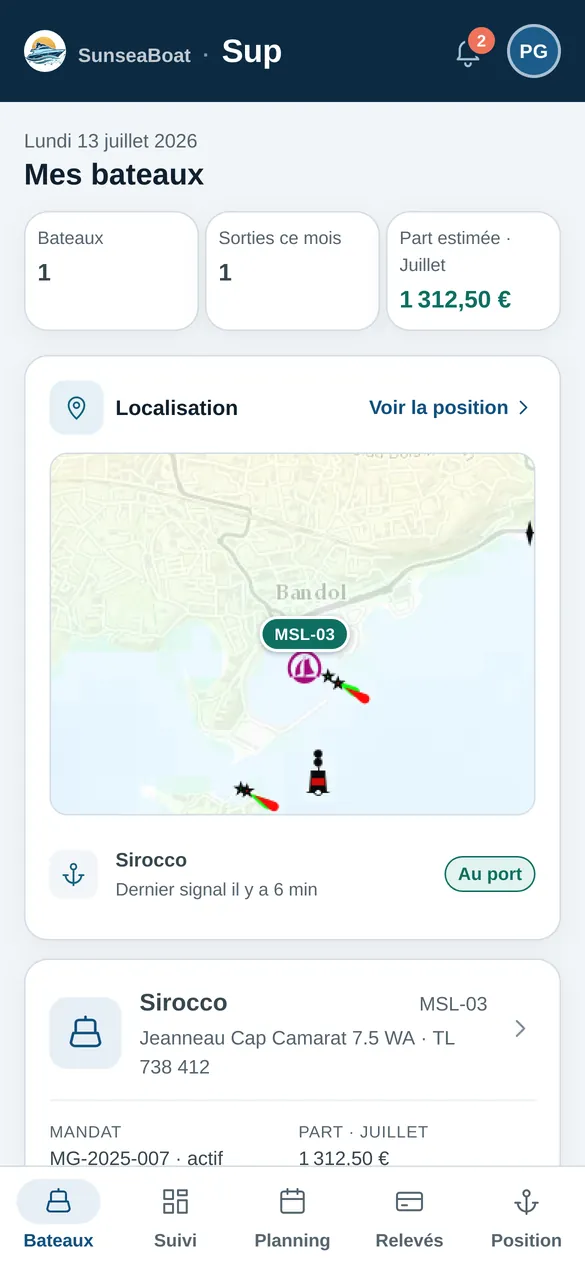
    The portal for owners who entrust you with a boat: their boats, position, schedule, maintenance log and income — and nothing else.

    Discover Sup

Much more than a planner

Complete control of your boating business.

Operations, maintenance, finance and teams finally share the same information.

Planned

E-invoicing & accounting

SunSea Hub already tracks advance payments, balances, security deposits and amounts to recharge. The next step will connect this flow to e-invoicing and to your accounting software.

  • Electronic invoices and credit notes
  • Receipts and audit trail
  • Accounting transfer without double entry
SunSea Hub↔Your accounting

Live

Marine maintenance management

The dock inspection, the workshop diagnosis and the technical history live in a single maintenance chain.

  • Preventive plans by date or usage
  • Work orders, tasks and priorities
  • Parts, costs, time spent and receipts
  • Defects, incidents and notifications
87 hNext service at 100 h

Live

Monitoring & geofencing

Follow the fleet beyond the pontoon: live position, zones, alerts — and the same map for your owners.

  • Real-time map and position, Teltonika tracker
  • Navigation zones, no-go zones, ports
  • WhatsApp alerts: zone exit, fuel, battery, water ingress, impact, departure without a booking
  • Boat position, track and readings in Sup
3 boats at sea

Live

Staff & crews

One shared directory, with two operational groups: shore teams and seagoing staff.

  • Reception, dock, cleaning, fuel and workshop
  • Skippers, captains, hosts and deckhands
  • Positions, qualifications and rules by role
  • Availability and staffing alerts
DOCK 6CREWS 4WORKSHOP 3

Features

What the platform does for you, every day of the season.

  • Planner and availability

    One calendar is the reference: options, bookings, owner blocks and workshop downtime.

  • Quotes and contracts

    The quote goes out as a link, the customer accepts it online, and the contract and inspection report are signed electronically.

  • Online booking on your website

    A widget sits on your website: the customer picks the boat, date and time slot, sees the price from your rate card, then pays an advance payment or asks for a quote. The booking lands in your planner.

  • Payments and security deposits

    Advance payment by link, balance and security deposit contactless at the dock, card pre-authorisation, automatic release of the deposit.

  • Photo inspections

    A guided photo plan at departure and return, checked automatically, kept as evidence in case of a dispute.

  • Fuel and cleaning

    Levels recorded at departure and return, refuels and shortfalls recharged, cleaning log before closing.

  • Maintenance and workshop

    Preventive plans, work orders, tasks, parts, costs, receipts, defects and technical history for each boat.

  • WhatsApp, SMS and email

    Message templates, automatic reminders, a follow-up inbox and conversations with every customer.

  • Shore staff and crews

    Reception, dock, cleaning, fuel and workshop; skippers, captains and crews with qualifications, availability and staffing alerts.

  • Owner management

    Signed management agreements, mandatory documents, personal blocks, income and payouts in a dedicated portal.

  • E-invoicing and accounting

    Accounting continuity without double entry, from payment to e-invoice, into the accounting software of your choice. Planned feature.

  • Monitoring and geofencing

    Live fleet position, trip tracks, zones and ports, WhatsApp alerts — water ingress, impact, departure without a booking, fuel, battery.

  • Document compliance

    IDs, licences, insurance, certificates, management agreements and signatures stay attached to the right booking.

How it works

Three steps, and your base runs on SunSea Hub.

  1. You write to us

    A form, then a thirty-minute call to understand your base: your boats, your seasons, your teams.

  2. We set up your base

    Fleet, rates, contract clauses, team accounts: we prepare everything with you, existing data included.

  3. Your teams get started

    The thirty-day free trial starts when everything is ready. No commitment: you decide at the end.

Pricing

Three plans, per boat per month.

No minimum term: choose according to what your teams use, switch as your base grows, stop whenever you want. 30-day free trial, no commitment.

  • Essentiel

    Fleet, to run the base from the office.

    On quoteexcl. VAT / boat / month

    • Fleet, customers and bookings
    • Planner and availability
    • Seasons and rate card
    • Quotes and contracts
    • Emails to customers
    Try Essentiel
  • Premium

    Everything in Pro, plus the workshop and owners.

    On quoteexcl. VAT / boat / month

    • Fix workshop: maintenance plans and work orders
    • Insurance, incidents and claims
    • Sup owner portal and payouts
    • Automatic reading of ID documents and licences
    • Automatic check of inspection photos
    Try Premium

Go further

What SunSea Hub publishes for rental companies and their customers.

  • For rental companies

    The rental operator guide

    Opening a base, Division 240, skippered rentals, security deposits, insurance — based on the official texts.

    Open
  • For boat owners

    Renting out your boat

    Entrusting your boat to a professional: the management agreement, the weeks you keep, the inspection report, the maintenance log, the payout statement.

    Open
  • Before choosing

    The comparison

    Five boat rental software packages compared on the same 17 criteria.

    Open
  • For your customers

    The cruising guides

    From Saint-Tropez to Monaco: anchorages, rules, ports — in English, French, German and Italian.

    Open
  • For your customers

    The practical guides

    Licence-free rentals, first trip, marine weather, coves, Posidonia.

    Open

Frequently asked questions

What rental companies ask us before trying.

Another question? Write to us.

What is SunSea Hub?

SunSea Hub is online management software for boat rental companies. It brings together the planner, quotes and contracts, payments and security deposits, dock inspections, maintenance, staff and the management of boats entrusted by owners, in four apps that share the same bookings.

Who is SunSea Hub for?

Companies renting boats by the half-day, day or week, with or without a licence, bareboat or skippered — including those managing boats on behalf of their owners.

What is boat rental management software?

Software that keeps in one place the boat planner, the bookings, quotes and contracts, payments and the security deposit, the check-in and check-out inspection, and fleet maintenance. Specialised software knows the boat — licence, seats, equipment, fuel, engine hours — and the dock, which a generic booking tool does not.

Do I need boat-specific software, or is a generic booking tool enough?

A generic booking tool takes dates and a payment. It does not do the photo inspection, the card pre-authorisation at the dock, the comparison of return with departure, or the recharging of fuel and breakage — yet that is where boat rental disputes are decided.

How does a boat rental security deposit work?

The rental company sets the amount in the contract. At departure, the deposit is taken as a card pre-authorisation, with no debit. At return, the signed inspection records damage, missing items and fuel, which are withheld from the deposit; the rest is released automatically, within the time set by the operator — 12 hours by default in SunSea Hub, 7 days at most.

Which GPS tracker for a rental boat fleet?

A Teltonika GPS tracker — an FMC920 or FMC230, for instance — wired to the boat’s battery, reporting position, speed, fuel and battery over the mobile network. SunSea Hub records trips and sends WhatsApp alerts: leaving the zone, water ingress, impact, departure without a booking.

How much does SunSea Hub cost?

Three plans — Essentiel, Pro and Premium — billed per boat per month, depending on the apps your teams use. The subscription has no minimum term: you stop whenever you want. Pricing is on quote during the launch. The trial is free for 30 days.

Do I need to install software?

No. SunSea Hub runs in the browser, on computer, tablet or phone: Fleet at the office, Check at the dock, Fix in the workshop.

Can my customers book online?

Yes. A booking widget sits on your website: the customer picks the boat, date and time slot, sees the price calculated from your rate card, then pays an advance payment or sends you a quote request, depending on the mode you choose. The booking goes straight into your planner.

How do payments and the security deposit work?

The advance payment is paid through a link sent to the customer. At the dock, the balance and the security deposit are taken by contactless card; the deposit is a card pre-authorisation, released automatically after the return, within the time you set. Payments are processed by Viva, a European payment institution.

Are contracts signed online?

Yes. The customer accepts the quote online, then signs the contract and the inspection report electronically, at departure and at return.

How does the dock inspection work?

With the Check app, on a phone: a guided photo plan, the equipment inventory, fuel and engine hours, at departure and then at return. Photos are checked automatically and kept as evidence in case of a dispute; missing items, breakage and fuel are recharged before closing.

Does SunSea Hub track boats at sea?

Yes, with a Teltonika GPS tracker on board: live position, trip tracks, navigation zones and ports, and WhatsApp alerts when a boat leaves its zone, takes on water, suffers an impact, leaves without a booking, or runs low on fuel or battery.

Can I bring my existing data?

Yes. We set up your base with you — fleet, rates, contract clauses, team accounts — using your existing data. The 30-day trial starts when everything is ready.

Where is the data hosted?

The servers are hosted by OVH in Singapore, outside the European Union. The full list of providers and what they receive is in the personal data policy.

Is SunSea Hub available in English?

The apps your teams use — Fleet, Check, Fix and Sup — are in French today. Everything your renters read is in English, French and German: the booking widget, quotes, payment links and messages. The rental contract is available in English and French.
Let’s talk about your base.

A thirty-minute call is enough to see whether SunSea Hub suits you. Then thirty days of trial, with no commitment.

Book a demo