 SunSea Hub
SunSea Hub › Features › Planner and bookings
Features · In the office
Booking planner and bookings: the rental operator’s office
Fleet is the office app. It holds the fleet, customers, rates and every booking, from enquiry through to balance and security deposit, on a planner that is the single source of truth for the whole company. What the dock, the workshop and owners see starts there.
A booking in eight steps
Each rental is a booking that moves forward in steps: enquiry, quote, reservation, advance payment, contract and documents, departure, return, balance and security deposit. The current step is open, the others fold away; the next action is always written at the top of the booking. Rescheduling, cancelling, refunding or issuing a credit note is done from a single “Actions” menu.
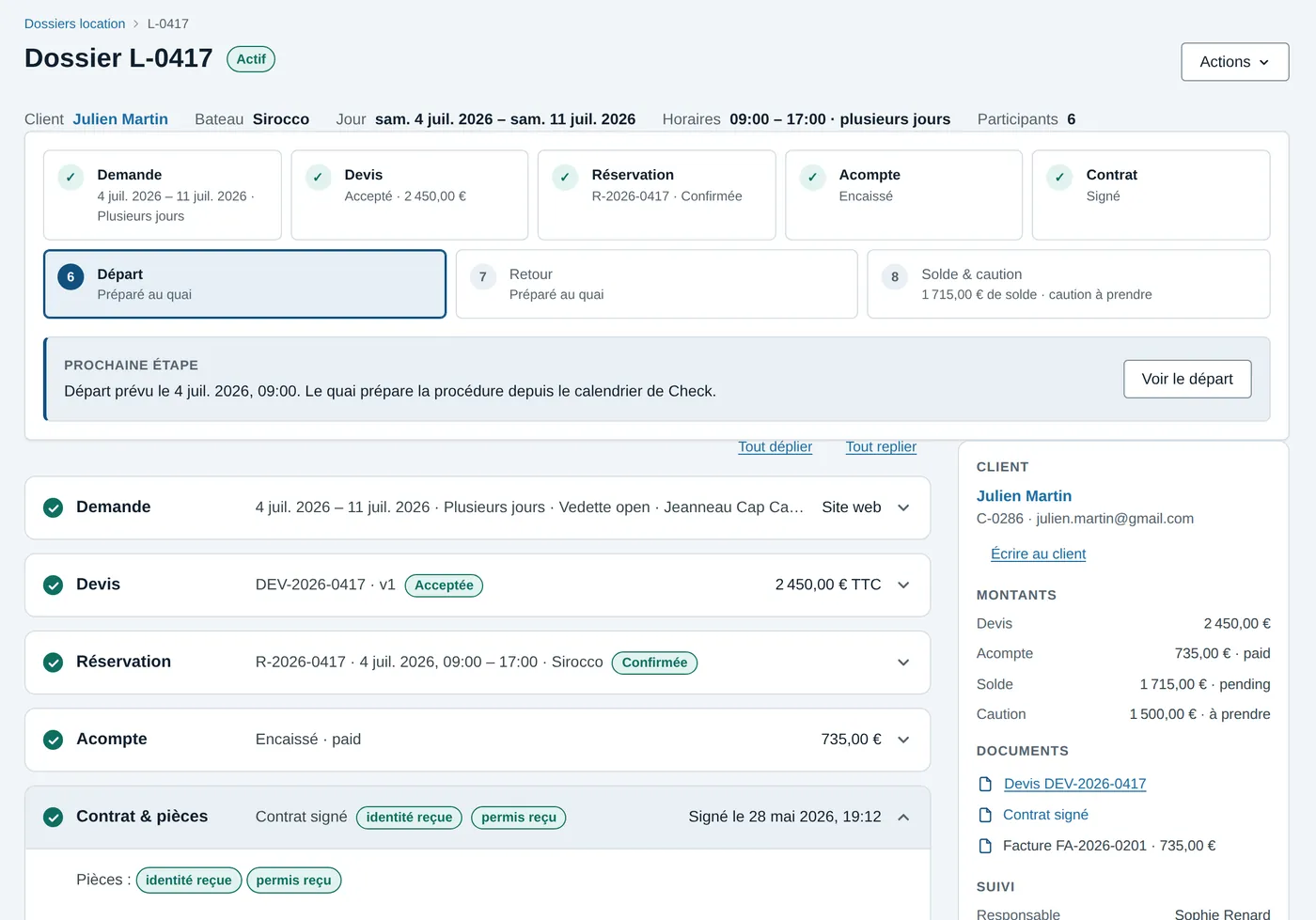
A planner that is the single source of truth
Provisional holds, reservations, periods reserved by owners and workshop downtime all live on the same calendar. A reservation cannot be placed on a boat taken off hire by the workshop; conversely, when the workshop takes a boat off hire, it sees the bookings affected and decides with full knowledge. Nothing is cancelled automatically.
From quote to advance payment, with no re-keying
The quote goes out as a link, on WhatsApp, by SMS or by e-mail. The customer opens it on their phone and confirms it with one button; the advance payment is paid by link, and the reservation is created. A quote that has been sent can be withdrawn, extended or replaced by an amended version. Reservations made on the rental company’s website, through the online booking widget, land in the same planner. The contract journey in detail.
Rates, seasons and extras
The rate grid is set by season and by duration — half day, full day or several days — with billable extras (skipper, equipment). The price of a quote or an online reservation is always calculated from this grid.
Customer messages in one place
WhatsApp, SMS and e-mail go out from templates, with automatic reminders: dock appointment reminder, return reminder, review request. Each customer has their own conversation thread, linked to their bookings.
The fleet, live
With a GPS tracker on board, Fleet also tracks the fleet at sea: position, zones, alerts. See fleet GPS tracking.
Staff, crews and documents
The staff directory brings together the shore teams — front desk, dock, washing, fuel, workshop — and the seagoing staff: skippers, captains, crews, with their qualifications and availability. IDs, licences, insurance, certificates and management agreements stay attached to the right record.
Invoices and accounting
Advance payments, balances, security deposits and recharged amounts are tracked in each booking, and invoices and credit notes are issued from Fleet. E-invoicing and transfer to accounting software are planned.
Frequently asked questions
Who can see what in Fleet?
Each account has a role. Dock staff have no access to accounting, workshop costs are restricted to authorised accounts, and an owner sees only their own boats, in their own portal.
Does Fleet replace a planning spreadsheet?
Yes: the Fleet planner is the single source of availability. Reservations, provisional holds, owners’ periods and workshop downtime are all on it, and both the dock and the booking website read the same calendar.
Can my customers book on my website?
Yes. The online booking widget sits on the rental company’s website: the customer chooses the boat, the date and the time slot, sees the price from the rate grid, then pays an advance payment or sends a quote request, depending on the mode chosen.
Read next
Online booking
A widget for the rental company’s website: the customer picks boat, date and slot, sees the rate-card price, pays an advance or requests a quote.
Online contract
The customer confirms the quote with one tap from WhatsApp, SMS or email, pays the advance by link, then signs the contract and inspection at the dock.
Check-in inspection
With Check: a photo plan per boat, inventory, fuel and engine hours, the customer’s signature at departure and return, return compared with departure.
Comparison
SunSea Hub, Nauticoncept, Nautic Manager, SeaBook and Boat Rental Manager on 17 criteria: deposit, inspection, GPS, pricing, no minimum term.
Fleet, Check, Fix and Sup — the office, dock, workshop and owner apps — are in French today. What your renters read is in English, French and German: the booking widget, quotes, payment links and messages. The rental contract is in English and French.