 SunSea Hub
SunSea Hub › Features › Online contract
Features · Contract
The boat rental contract, from quote to online signature
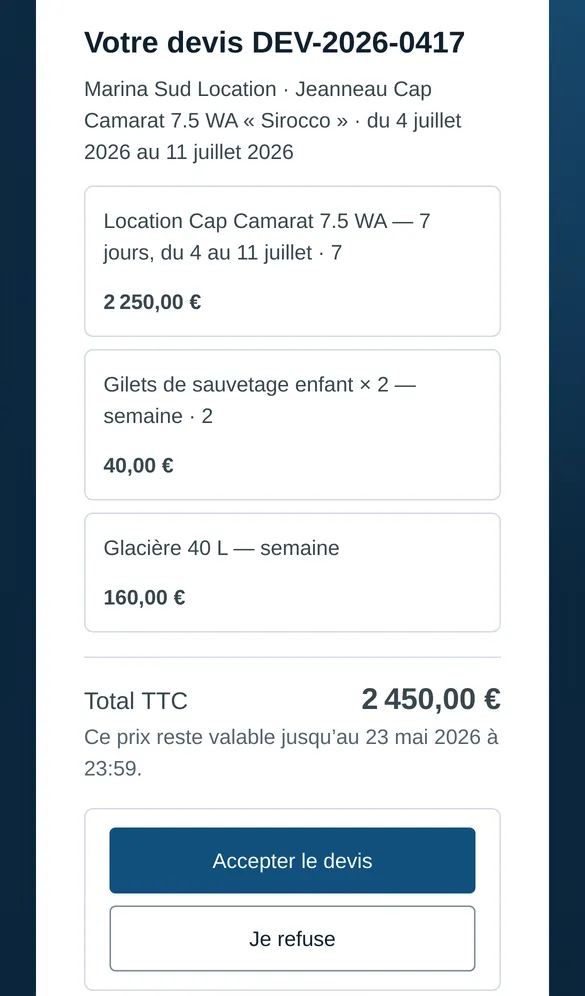
With SunSea Hub, the customer confirms the quote with one button from a link received by WhatsApp, SMS or e-mail, pays the advance payment online, then signs electronically at the dock the rental contract and the check-in inspection — and, on return, the check-out inspection. Each signed document is attached to the booking.
The customer journey
| Step | What the customer receives | What the rental company does |
|---|---|---|
| Quote | A link: the detailed quote, “Confirm my booking” or “I decline” | Sends the quote from the booking; can withdraw it, extend it or amend it |
| Advance payment | A payment link | Sees the advance payment collected, the reservation confirmed |
| Documents | A request for an ID document and a licence | Receives the documents, read automatically |
| Departure | The contract and the check-in inspection to sign on the agent’s phone | Collects the security deposit and balance after signature |
| Handover | Contract, check-in inspection and invoice by WhatsApp and e-mail | Nothing: they are sent when the departure closes |
What the contract contains
The contract sets out the rental company’s terms — its clauses, the security deposit, cancellation — the boat, the dates, the participants and the actual amounts: advance payment made, balance and security deposit. The customer signs before paying: what they sign is their commitment to pay these amounts.
ID documents and licences read automatically
The ID card, passport or licence is photographed; surname, first names and date of birth are read automatically, including from the machine-readable zone of passports. A duplicate customer record is flagged.
The same signature for management agreements
An owner’s management agreement and a freelance skipper’s contract are signed through the same electronic process, and stay attached to the right record.
Frequently asked questions
Does the customer have to create an account?
No. They open the links they receive; the quote, the advance payment and the documents are handled without a password.
Can a quote that has already been sent be changed?
Yes: withdraw it, extend its validity or send an amended version, which replaces the previous one.
Where are signed documents kept?
In the booking, with their signed version; a signed document is never replaced, a new version is added.
Read next
Online booking
A widget for the rental company’s website: the customer picks boat, date and slot, sees the rate-card price, pays an advance or requests a quote.
Planner and bookings
Fleet, the rental operator’s office: fleet, customers, seasonal rates and every booking, from the enquiry to the deposit release, on one planner.
Security deposit
A contactless card pre-authorisation at the dock: authorised, not debited. At return, amounts due are taken; otherwise released within 12 hours.
Comparison
SunSea Hub, Nauticoncept, Nautic Manager, SeaBook and Boat Rental Manager on 17 criteria: deposit, inspection, GPS, pricing, no minimum term.
Fleet, Check, Fix and Sup — the office, dock, workshop and owner apps — are in French today. What your renters read is in English, French and German: the booking widget, quotes, payment links and messages. The rental contract is in English and French.